

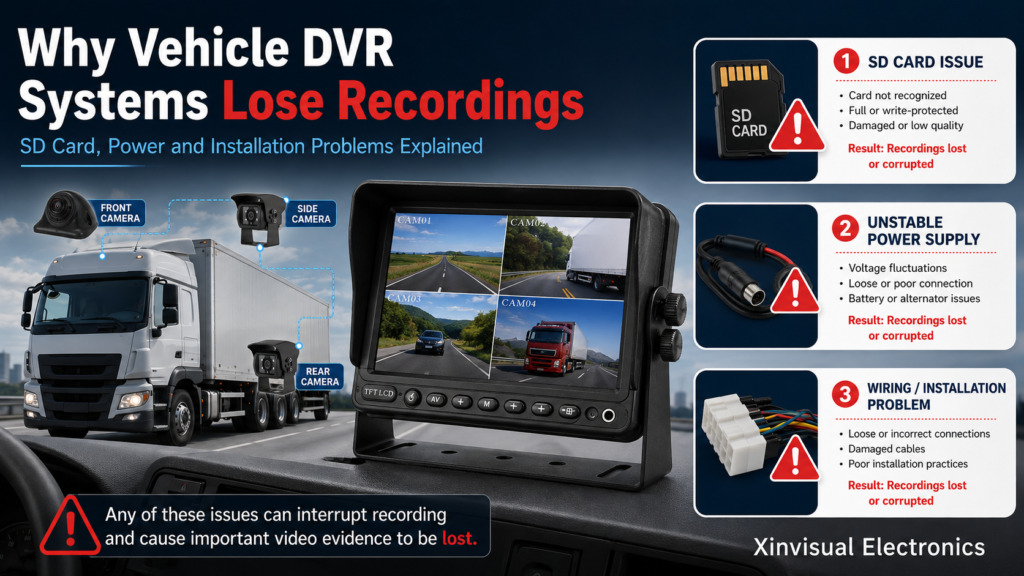
Why Vehicle DVR Systems Lose Recordings: SD Card, Power and Installation Problems Explained
A vehicle DVR system is installed for one clear reason: to keep video evidence when something happens.
But in real commercial vehicle projects, one of the most frustrating problems is discovering that the recording was not saved, the file is missing, the video is corrupted, or the DVR stopped recording before the incident.
For fleet managers, this can mean missing accident evidence.
For distributors, it can mean warranty complaints.
For installers, it can mean repeated troubleshooting.
For OEM engineers, it can mean system integration risk.
In most cases, lost recordings are not caused by the camera alone. They usually come from a combination of SD card issues, unstable power, incorrect DVR settings, poor wiring, loose connectors, vibration, or installation mistakes.
This guide explains the most common reasons why a vehicle DVR system loses recordings and what B2B buyers should check before choosing or installing a commercial vehicle DVR monitor.
Why Recording Reliability Matters in Commercial Vehicle Projects
A vehicle camera recording system is not only for daily monitoring. It may be used for:
- Accident evidence
- Driver behavior review
- Cargo protection
- Fleet safety management
- Insurance claims
- Reversing incident review
- Blind spot event analysis
- Dispute handling
- Training and operation improvement
When the system loses recordings, the buyer may not complain about image quality first.
They will ask:
“Why did the DVR not save the video when we needed it?”
That is why recording reliability should be considered from the beginning of the project, not only after installation.
Common Signs of Vehicle DVR Recording Problems
A vehicle DVR recording problem may appear in several ways:
- No recording file is found
- Only part of the trip is recorded
- Video files are corrupted
- The SD card shows an error
- The DVR restarts during driving
- Some camera channels are missing
- Recording stops after several hours
- The system records only when triggered
- The timestamp is wrong
- Old files are overwritten too quickly
- Playback works on the DVR but not on a computer
- The monitor shows camera image but no video is saved
These symptoms may look similar, but the causes can be different.
The best troubleshooting method is to check the full chain:
Storage → Power → Camera signal → Wiring → Settings → Installation environment
1. SD Card Problems: The Most Common Cause of Lost Recordings
In many vehicle DVR projects, the SD card is the first component to check.
A DVR system writes video files continuously. This creates much heavier use than a normal camera or office device. If the card is not suitable, the system may record for a short time and then start losing files.
Common SD Card Issues
A SD card DVR recording issue may be caused by:
- Low-quality SD card
- Fake or unstable capacity card
- Wrong speed class
- Card not formatted by the DVR
- Card file system error
- Card reaching write-cycle limit
- Using a consumer card in a high-write vehicle DVR
- Removing the card while the DVR is still writing
- Vibration affecting card contact
- Extreme temperature inside the vehicle
- Overwrite setting not configured correctly
For commercial fleets, the SD card should not be treated as a small accessory. It is the storage foundation of the entire recording system.
What B2B Buyers Should Check
Before bulk installation, buyers should confirm:
- Maximum SD card capacity supported by the DVR
- Recommended SD card type
- Whether the DVR needs to format the card before use
- Expected recording hours at different resolutions
- Whether loop recording is supported
- Whether event files are protected from overwrite
- Whether the card is easy to access for maintenance
- Whether the supplier has tested specific SD card models
A large-capacity card does not always solve the problem if the card quality is poor or incompatible with the DVR.
2. Wrong Formatting or File System Errors
Many DVR recording issues happen because the SD card was not formatted correctly.
Some buyers insert a new card and expect it to work immediately. In practice, many vehicle DVR systems require the card to be formatted inside the DVR menu before recording.
If the card was formatted by a computer, mobile phone, dash cam, or another DVR system, the file system may not match the DVR’s recording structure.
Possible Symptoms
- DVR detects the card but does not record
- Files appear but cannot be played
- Recording stops after a few minutes
- The system shows storage error
- Loop recording does not work correctly
- The card works in one DVR but not another
Recommended Practice
For commercial vehicle DVR monitor projects, installers should:
- Format the SD card inside the DVR system
- Test recording before delivery
- Check playback on the DVR
- Confirm timestamp and channel display
- Record a short test video after installation
- Restart the vehicle and confirm recording continues
This simple step can prevent many after-sales issues.
3. Power Instability: A Hidden Cause of Missing Files
A vehicle DVR system needs stable power to record correctly.
Commercial vehicles often have complex electrical environments. Starting the engine, reversing, braking, operating hydraulic equipment, or switching accessories can create voltage fluctuation.
If the DVR loses power suddenly while writing video, the current file may be corrupted or not saved.
Common Power-Related Causes
Recording loss may happen because of:
- Voltage drop during engine start
- Loose power connection
- Poor grounding
- Wrong ACC connection
- Unstable power adapter
- Power cable too thin or too long
- Shared power with high-current devices
- Battery cut-off during parking
- No delay shutdown function
- Incorrect wiring between constant power and ignition power
For a truck DVR camera system, power design is just as important as camera selection.
What Buyers Should Confirm
Before installation, confirm:
- DVR input voltage range
- Whether the vehicle is 12V, 24V, or wide-voltage
- Whether the DVR needs ACC and constant power
- Whether delayed shutdown is supported
- Whether parking recording is required
- Whether the ground point is reliable
- Whether power is taken from a stable circuit
- Whether fuse protection is included
A DVR may record normally during testing, but fail during real driving if the power supply is unstable.
4. Incorrect ACC and Shutdown Wiring
Many vehicle DVR systems rely on ACC signal to start and stop recording.
If ACC wiring is incorrect, the DVR may turn off too early, fail to start, or stop recording when the vehicle is still operating.
Common ACC Wiring Mistakes
- ACC connected to unstable accessory power
- Constant power and ACC reversed
- DVR shuts down immediately after ignition off
- Parking recording expected but no constant power connected
- Delay shutdown not configured
- DVR power cut while final file is still saving
This can create a situation where the DVR appears to work, but the last file of the trip is missing or corrupted.
Better Installation Practice
Installers should check:
- Constant power line
- ACC line
- Ground line
- Fuse connection
- Shutdown delay setting
- Parking mode setting
- Recording status after ignition off
- Recording status after vehicle restart
For fleet projects, wiring should be standardized across vehicles to avoid inconsistent behavior.
5. Camera Signal Loss Can Affect Recording
A DVR can only record the camera channels that it receives correctly.
If a camera signal is unstable, the DVR may save incomplete footage, show black screen on one channel, or record only part of the video.
Possible Causes
- Loose camera connector
- Damaged extension cable
- Water ingress at connector
- Wrong camera signal format
- AHD/CVBS mismatch
- Long cable without proper shielding
- Poor grounding
- Camera power output problem
- Trigger view not configured correctly
- Monitor channel set incorrectly
In many cases, the customer says “the DVR lost recording,” but the real issue is camera signal loss.
What to Check
For a multi-camera DVR system, verify:
- Each channel displays correctly
- Each channel records correctly
- Camera signal format matches the DVR
- Connectors are locked tightly
- Cable routing is protected
- No channel drops during vibration
- Rear, side, and front cameras are tested separately
- Playback shows all required channels
A stable video input is required before the DVR can record reliably.
6. Vibration and Loose Connectors
Commercial vehicles operate in vibration, shock, and temperature changes.
A connector that works during installation may loosen after driving on rough roads, entering construction sites, or operating in warehouses.
Common Vibration-Related Issues
- DVR power plug becomes loose
- Camera connector loses contact
- SD card contact becomes unstable
- Cable is pulled by vehicle movement
- Monitor bracket shakes excessively
- Internal connection becomes unstable over time
This is why vehicle-grade connectors, proper cable fixing, and vibration-resistant installation are important.
For trucks, buses, forklifts, agricultural machines, and construction vehicles, the DVR system should be installed as a vehicle system, not like a home electronics device.
7. Overwrite Settings and Storage Capacity
Sometimes the DVR is not “losing” files. It is overwriting old files normally.
Loop recording is designed to keep the system recording continuously by deleting older files when the storage is full.
This is useful, but it can cause misunderstanding.
Common Overwrite Problems
- Storage capacity is too small
- Video resolution is set too high
- Too many channels are recording
- Event files are not protected
- Important files are overwritten before being checked
- Customer expects several days of storage but only has one day
- DVR records continuously instead of only when needed
For example, a 4-channel DVR recording at higher resolution will consume storage much faster than a single-channel system.
What Buyers Should Confirm
Before choosing storage capacity, confirm:
- Number of camera channels
- Recording resolution
- Frame rate
- Compression format
- SD card capacity
- Continuous or triggered recording mode
- Expected recording hours
- Whether audio is recorded
- Whether event files are locked
- Whether the customer needs longer storage retention
Storage expectation should be discussed before the system is sold.
8. Time and Date Errors
Wrong time settings can make recordings look missing.
If the DVR date is incorrect, files may be saved under the wrong day or time folder. The customer may search the expected time and think the recording is gone.
Possible Causes
- Clock not set before use
- Backup battery issue
- GPS time not configured
- Power loss resets the system
- Wrong time zone
- Daylight saving time not considered
- DVR firmware setting issue
Practical Check
After installation, always confirm:
- Date
- Time
- Time zone
- Vehicle number if used
- Camera channel names
- Recording file structure
- Playback search function
This is especially important for fleets that use footage for evidence.
9. Heat, Cold, and Harsh Vehicle Environments
Commercial vehicles do not operate in clean indoor environments.
A DVR system may face:
- Summer cab heat
- Winter cold starts
- Moisture
- Dust
- Vibration
- Road salt
- Washdown
- Long working hours
- Engine electrical noise
If the DVR, monitor, cable, connector, or SD card is not suitable for this environment, recording reliability can be affected.
For B2B projects, buyers should check:
- Operating temperature range
- Storage temperature range
- Heat dissipation design
- Cable material
- Connector sealing
- Monitor mounting position
- DVR ventilation
- SD card temperature rating
- Shock and vibration resistance
A system that works in a sample test may still fail if installed in the wrong location inside the vehicle.
10. Installation Location of the DVR Monitor
Where the DVR monitor is installed can affect both usability and reliability.
Poor installation locations include:
- Direct sunlight with excessive heat
- Areas exposed to water
- Loose dashboard surface
- High-vibration mounting point
- Places that block driver view
- Areas where cables are bent sharply
- Locations with poor ventilation
- Positions where operators may hit the cable or SD card slot
A commercial vehicle DVR monitor should be installed where the driver can see the screen clearly, but the device should also remain stable, ventilated, and protected.
Good installation improves both safety and recording reliability.
Application Scenarios
Logistics Trucks
Trucks often use DVR systems for rear-view, side-view, and front-view recording.
Common risks include:
- Long cable runs
- Rear camera connector water ingress
- Voltage fluctuation during engine start
- SD card overwrite due to long driving hours
- Side camera signal loss
- Vibration on rough roads
- Driver complaints after missing incident footage
For logistics fleets, stable power and proper storage planning are especially important.
Forklifts
Forklifts may use DVR systems in warehouses, cold storage, factories, and loading areas.
Common challenges include:
- Frequent stop-start operation
- Vibration
- Limited installation space
- Cold storage condensation
- Power wiring differences
- Operator shifts
- Cable damage around moving parts
- Short but frequent working cycles
For forklift applications, the DVR system must be compact, stable, and easy to maintain.
Heavy Machinery
Construction machines, agricultural vehicles, and industrial equipment face harsher environments.
Common risks include:
- Dust
- Mud
- Shock
- Washdown
- Strong vibration
- Long outdoor exposure
- High current equipment nearby
- Cable pulling or crushing
For heavy machinery, connectors, cable protection, and device mounting are critical.
Buyer Checklist for Vehicle DVR Systems
For Fleet Managers
- How many hours of video must be stored?
- How many cameras will record at the same time?
- Is recording required during driving only or also parking?
- How often will SD cards be checked?
- Are drivers trained to report DVR errors?
- Is missing footage a serious insurance or safety risk?
- Can the system reduce dispute and accident investigation time?
For OEM Engineers
- What is the vehicle voltage range?
- Does the DVR require ACC and constant power?
- Is delayed shutdown needed?
- What camera signal formats are supported?
- What storage format and capacity are required?
- Is the installation location stable and ventilated?
- Are vibration, EMC, and temperature requirements defined?
- Are connectors and cables suitable for production integration?
For B2B Distributors
- Is the DVR recording capacity easy to explain?
- Are SD card recommendations available?
- Does the supplier provide wiring diagrams?
- Is the system available as a complete camera and monitor kit?
- Are replacement cables and accessories available?
- Can the customer check recordings easily?
- Is the warranty policy clear?
- Are installation videos or user manuals available?
For Installers
- Is the SD card formatted in the DVR?
- Does every camera channel record correctly?
- Is power wiring stable?
- Are ACC and constant power connected correctly?
- Is the ground point reliable?
- Are cables protected from vibration and sharp edges?
- Is the monitor mounted securely?
- Has recording been tested after engine restart?
- Has playback been verified before delivery?
Common Mistakes to Avoid
Mistake 1: Using a Random SD Card
A low-quality SD card may work for a short test but fail during continuous vehicle recording.
Use a card that matches the DVR requirement and test it before delivery.
Mistake 2: Assuming the Monitor Image Means Recording Is Working
A live image on the monitor does not always mean the DVR is recording.
Always check the recording icon, storage status, and playback files.
Mistake 3: Ignoring Power Shutdown Behavior
If the DVR loses power while saving a file, the last video may be corrupted.
Correct ACC wiring and delayed shutdown settings can help reduce this risk.
Mistake 4: Not Testing All Channels
A multi-channel DVR may display one camera correctly but fail to record another channel.
Each camera channel should be tested individually.
Mistake 5: Not Explaining Storage Time to Customers
Customers may expect several days of recordings, while the SD card only stores one day at the selected resolution.
Storage time should be clearly explained before order confirmation.
How Xinvisual Electronics Supports Vehicle DVR Projects
Xinvisual Electronics provides vehicle cameras, vehicle monitors, DVR monitor systems, and camera system accessories for B2B commercial vehicle applications.
Our vehicle DVR-related solutions can support:
- Rear-view recording
- Side-view recording
- Front-view recording
- Multi-camera display
- AHD and CVBS camera input options
- Trigger display functions
- DVR recording functions depending on model
- SD card recording options depending on model
- Wide voltage vehicle applications
- Truck, bus, forklift, agricultural, and construction vehicle projects
For buyers evaluating a vehicle DVR system, we can help review:
- Camera channel quantity
- Monitor size
- Recording requirement
- SD card capacity
- Power input
- Trigger wire function
- Cable length
- Connector type
- Installation environment
- B2B project configuration
The goal is not only to display a clear image, but also to help the system record reliably when the footage matters.
Conclusion
A vehicle DVR system usually loses recordings because of one or more practical issues: SD card quality, wrong formatting, unstable power, incorrect ACC wiring, camera signal loss, loose connectors, vibration, overwrite settings, or installation mistakes.
For commercial vehicle projects, recording reliability must be designed into the full system.
That means checking:
- SD card compatibility
- Power stability
- Camera signal
- Cable and connector quality
- DVR settings
- Storage capacity
- Installation position
- Playback verification
A reliable vehicle camera recording system is not only about the DVR itself. It is about how the DVR, cameras, monitor, cables, power supply, and installation work together.
Need a vehicle DVR system for trucks, buses, forklifts, agricultural vehicles, or heavy machinery?
Contact Xinvisual Electronics to discuss your camera channels, recording time, SD card requirement, monitor size, power input, and installation environment.
Request a sample, ask for a B2B quotation, or consult our team for a suitable commercial vehicle DVR monitor and camera system configuration.
FAQ
Q1: Why does a vehicle DVR system lose recordings?
A vehicle DVR system usually loses recordings because of SD card errors, unstable power supply, incorrect ACC wiring, camera signal loss, loose connectors, overwrite settings, or installation problems. The DVR, SD card, cameras, cables, and vehicle power must work together to record reliably.
Q2: Can a bad SD card cause DVR recording failure?
Yes, a bad SD card can cause DVR recording failure because vehicle DVR systems write video continuously and require stable storage performance. Low-quality, fake, slow, incorrectly formatted, or worn-out SD cards may cause missing files, corrupted videos, recording stops, or storage errors.
Q3: Why does my DVR show live video but not save recordings?
A DVR may show live video but not save recordings if the SD card is missing, full, damaged, incorrectly formatted, or not recognized by the system. Recording settings, overwrite mode, channel selection, power interruption, or firmware configuration can also prevent video files from being saved.
Q4: How can installers prevent vehicle DVR recording problems?
Installers can prevent vehicle DVR recording problems by using a suitable SD card, formatting it inside the DVR, checking stable power and ground, wiring ACC correctly, testing every camera channel, protecting cables, securing connectors, setting the correct time, and verifying playback before vehicle delivery.