


Cover image: warehouse application illustration supplied for this guide, not a documented Xinvisual customer installation.
A wireless forklift camera system in a warehouse should be selected around the view the operator needs and the conditions in which that view must remain usable. A clear picture on a workbench does not establish performance behind a raised mast or inside a stocked racking aisle. For distributors and installers, the useful deliverable is an agreed placement plan, an on-truck acceptance record and a practical handover routine.
This guide focuses on warehouse placement and field acceptance. For broader blind-spot planning, see the forklift blind spot camera system guide; for a configured project, see the forklift safety camera solution.
1. Define the visibility task before choosing hardware
Ask what the operator needs to see, on which truck, and during which maneuver. Fork alignment at height, reversing and dock traffic are different tasks. Counterbalance trucks, reach trucks and order pickers have different mast movements, operator positions and available mounting surfaces. Record the truck model, mast type, working lift height, load dimensions, aisle layout and existing traffic controls before proposing a kit.
| Warehouse task | View to establish | Acceptance question |
|---|---|---|
| High-bay stacking | Fork tips, pallet pockets or rack opening | Can the operator distinguish the required alignment detail at each agreed working height? |
| Reversing and aisle exits | Rear travel area and relevant side approaches | Which areas remain hidden by the truck, load or racking? |
| Dock work and crossings | Defined approach or loading area | Does changing light, a dock door or the load obscure the required view? |
A camera remains a visibility aid. It does not authorize travel with an obstructed view or replace site traffic controls. In US workplaces, OSHA’s powered industrial truck standard addresses operator training, clear travel views and slowing at obstructed cross aisles. Apply the rules for the operating jurisdiction and the truck manufacturer’s instructions.
2. Match the camera position to the task
Start with a temporary placement review on a secured truck, then confirm the bracket, clearances and final mounting method with the installer and truck owner. Do not drill, weld or alter forks, mast members or an overhead guard without the required manufacturer approval. A magnetic mount still needs a suitable surface, secure retention and clearance verification.
| Candidate position | Intended task | Physical checks | Link decision |
|---|---|---|---|
| Fork carriage or a purpose-designed fork-view mount | Pallet pocket entry and alignment | Load contact, fork adjustment, attachment travel and impact exposure | Wireless can reduce video-cable routing across moving sections; power still needs planning |
| Suitable mast crossmember | Forward working view at specified lift positions | Chains, hoses, free-lift movement, tilt and all moving clearances | Compare wireless with a properly engineered moving-cable arrangement |
| Rear chassis or counterweight area | Reversing view | Impact exposure, service access and camera coverage | A protected fixed cable route may make wired practical |
| Suitable guard or cab pillar position | Defined side or approach view | Headroom, rack overhang and the operator’s direct sightlines | Select wired or wireless after checking routing and radio performance |

Why moving masts deserve a separate review
A wired installation across a moving mast needs a cable arrangement designed for its motion and environment. Routing, bend radius, strain relief and clearance can affect service life. Wireless video can remove that video-cable run, but it introduces a radio link to validate and does not necessarily remove the camera’s power cable. Avoid treating either design as maintenance-free.
3. Choose wired or wireless by position
Wireless is worth evaluating where moving structures or retrofit constraints make video-cable routing difficult. Wired can be practical where a protected route already exists on a fixed part of the truck. A mixed installation may be appropriate if the selected equipment supports it. Compare the complete configuration, including camera power, display input compatibility and service access.
Neither connection type guarantees uninterrupted visibility. A site that needs a particular view for a maneuver should define what the operator must do if it is unavailable. Troubleshooting should check power, mounting, connectors and configuration as well as the video link. See the wired versus wireless vehicle camera systems guide for the broader comparison.
4. Five checks before quoting a warehouse fleet
Electrical supply: verify more than nominal battery voltage
Identify the approved accessory supply and its operating range for the actual forklift. Traction-battery voltage is not automatically the voltage available or suitable at a camera connection. Check the camera, monitor, receiver and any converter separately, including maximum supply conditions, protection, current demand and the truck manufacturer’s connection requirements. A qualified installer should specify the connection and any required DC-DC converter; do not assume direct compatibility from a nominal voltage label.
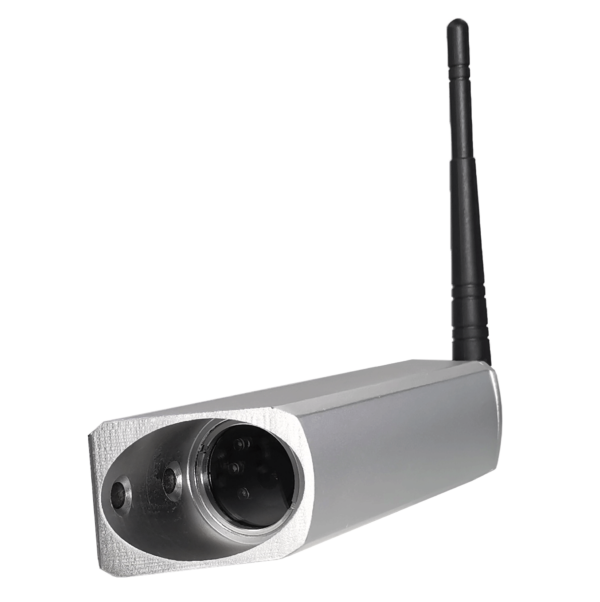
For one specific example, the Xinvisual XST-C3158 wireless forklift camera page lists DC 10–45 V input, CVBS 800TVL, magnetic mounting and an optional rechargeable battery pack. Those details belong to that camera, not every wireless kit or its monitor. Confirm the matched system and current order specification before installation.
Radio performance in stocked aisles
Confirm the operating band and antenna requirements for the exact system. Metal racking, the mast, loads and changes in antenna orientation can affect reception; other radio equipment may also affect the test environment. An open-area range claim cannot establish performance at every warehouse position. Include stocked aisles, turns, lift positions and dock transitions in the acceptance plan, and record the conditions actually tested.
Camera power and charging ownership
Wireless describes the video path, not the power source. For a rechargeable pack, confirm the exact pack, charger, permitted charging environment and demonstrated runtime against the intended shift. Assign responsibility for charging or swapping and record whether a spare is supplied. For truck power, document the approved connection, protection and converter where used. Do not invent a runtime from battery capacity alone.
Monitor position and usable detail
Check the display from the operator’s normal seated or standing position, as applicable to the truck. It should show the required alignment or travel detail without obstructing direct sightlines, controls, entry or exit. Assess glare, gloves, vibration and the number of views displayed. A larger screen or wider camera angle is not automatically more useful for a small pallet pocket.
Pairing and simultaneous trucks
Confirm the pairing method, supported camera count and recovery behavior after power loss or replacement. Test intended neighboring systems operating together; check that each display keeps the correct camera identification. A two-truck trial is a starting point, not evidence that twenty trucks can operate simultaneously without interference. Plan a representative multi-truck pilot before fleet acceptance.
Environmental suitability is also model-specific. Check camera, monitor, battery, connectors and installation conditions separately for dust, cleaning and outdoor dock exposure. An IP rating alone does not establish cleaning-agent compatibility or freezer suitability. Cold-storage projects need documented temperature limits and a controlled assessment of visibility during temperature transitions.
5. A five-step on-site acceptance test
Agree on the route, load, heights, operating conditions and pass/fail criteria with the site’s responsible personnel before starting. Use an authorized operator and a controlled area isolated from pedestrian traffic. Observers remain outside the operating envelope. Stop if the image fails or a hazard appears; do not continue a maneuver solely to complete a test.
- Stationary baseline. Secure the truck according to its instructions. Record the camera, monitor, battery or supply, software/settings where available, mounting position and pairing procedure. Confirm image orientation and camera identity.
- Controlled mast movement. With the truck stationary in an approved test area, check the agreed working heights and tilt positions using a suitable load within the truck’s rated limits. Record obstruction, freezing, breakup or loss of required detail. Keep people clear of raised loads and moving mast parts; do not reach in to adjust a camera during operation.
- Travel at the prescribed load height. Lower the load to the manufacturer’s permitted travel position before the route test. At a site-approved safe speed, assess the agreed aisle and reversing route, turns and lighting transitions. Follow visibility and traffic procedures; do not travel with a raised load to test reception.
- Simultaneous-system and restart checks. In a controlled area, operate the agreed number of neighboring camera systems and restart them using safe procedures. Record wrong-camera display, interruption, recovery and re-pairing behavior. Do not extrapolate a two-truck result to the whole fleet.
- Record the scope and disposition. List truck IDs, mast types, loads, tested heights, routes, duration and participating systems. Mark untested conditions explicitly. Resolve failures and repeat the affected test before approval.
For US safety context, OSHA’s traveling and maneuvering guidance emphasizes safe travel height and keeping the travel path visible. The camera test must fit the site’s safe operating method.
One successful sample supports only the recorded configuration and conditions. Repeat relevant checks when the truck type, mast, load, mounting position, warehouse zone, firmware or number of nearby systems changes.
6. Handover checklist for each installed truck
- Truck ID, model, mast type, working heights and approved power source recorded
- Exact camera, receiver, monitor, bracket, antenna and battery/converter configuration identified
- Camera clearances and monitor sightlines checked through the agreed operating positions
- Pairing, camera identity and restart procedure documented
- Charging or battery-swap responsibility assigned, with approved charger and storage location
- Lens, mounting and cable/connector checks included in the site’s inspection routine
- Field-test results, failures, corrective work and untested conditions retained
- Operator response to image loss or unacceptable delay agreed
- Warranty period, coverage and RMA procedure confirmed in the written order terms
Frequently asked questions
Will a wireless forklift camera lag?
The complete camera-to-display path has delay. Wireless processing is one contributor, but wired systems also have processing delay. No universal millisecond value or acceptable threshold is assumed here. Agree on task-specific criteria and test the actual kit; visible lag that compromises the intended maneuver requires resolution before acceptance.
How is a mast camera powered without a video cable?
Possible configurations include an approved power feed or a rechargeable pack. A truck-powered wireless camera can still need a power cable across moving sections. Xinvisual’s XST-C3158 page lists an optional rechargeable battery pack; confirm availability, runtime and charging requirements for the ordered kit.
Can warehouse racking affect wireless reception?
Yes. Steel structures, the truck and its load can obstruct or alter the radio path. Test antenna positions and operating routes with representative stock levels. A clear view in an empty warehouse does not prove performance after it is filled.
Does a camera replace forklift safety procedures?
No. It supports a defined visibility task. Training, traffic separation, inspections and the truck manufacturer’s instructions remain essential. AI detection, warning alerts and recording require separate specification and validation; they are not implied by a live camera image.
Plan your warehouse forklift project
Send Xinvisual your forklift models, mast types, working heights, load dimensions, aisle layout, approved power options and charging routine. Include the views required and whether the project needs live viewing, recording or separately configured detection. Review the wireless camera system range or contact the team at info@xinvisual.com to discuss a matched sample configuration and the checks needed before a fleet rollout.